Overview
Some macOS users may see the following warning message when launching or using WorkSmart:
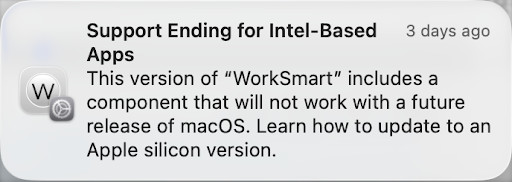
This warning appears after upgrading the macOS version, and can be resolved by downloading and installing the latest version of WorkSmart.
Resolution
Step 1 — Download the Latest Version of WorkSmart
Download the latest macOS version of WorkSmart from the official download site:
Downloading and Installing WorkSmart
Step 2 — Install the Update
- Open the downloaded installer
- Follow the installation prompts
- Replace the existing version if prompted
Step 3 — Launch WorkSmart
After installation:
- Open WorkSmart normally
- The warning message should no longer appear
FAQ
Will WorkSmart stop working immediately?
No. This is a future compatibility warning from macOS and does not mean the application is currently broken.
Is my data affected?
No. This warning does not impact WorkSmart data or user settings.
Benito Hall
Comments